For yoga, Pilates and aerial studios on WellnessLiving

Get your evenings back. Keep WellnessLiving.

Studio Bolster finds subs, adds up teacher pay, shows which classes make money and answers students after hours. It works on top of the WellnessLiving account you already have.

  • Members, cards and booking stay put
  • Set up with you on a call
  • Founding studios pay half for a year
Class profit: a week of classes, each colored by what it has left after teacher pay and rent
The Teacher Portal on a phone, listing classes that need a sub with an I'll take it button

See it

The real screens, not mockups

Every picture here is the software Renegade Yoga runs, shown with Juniper Yoga, our made-up demo studio.

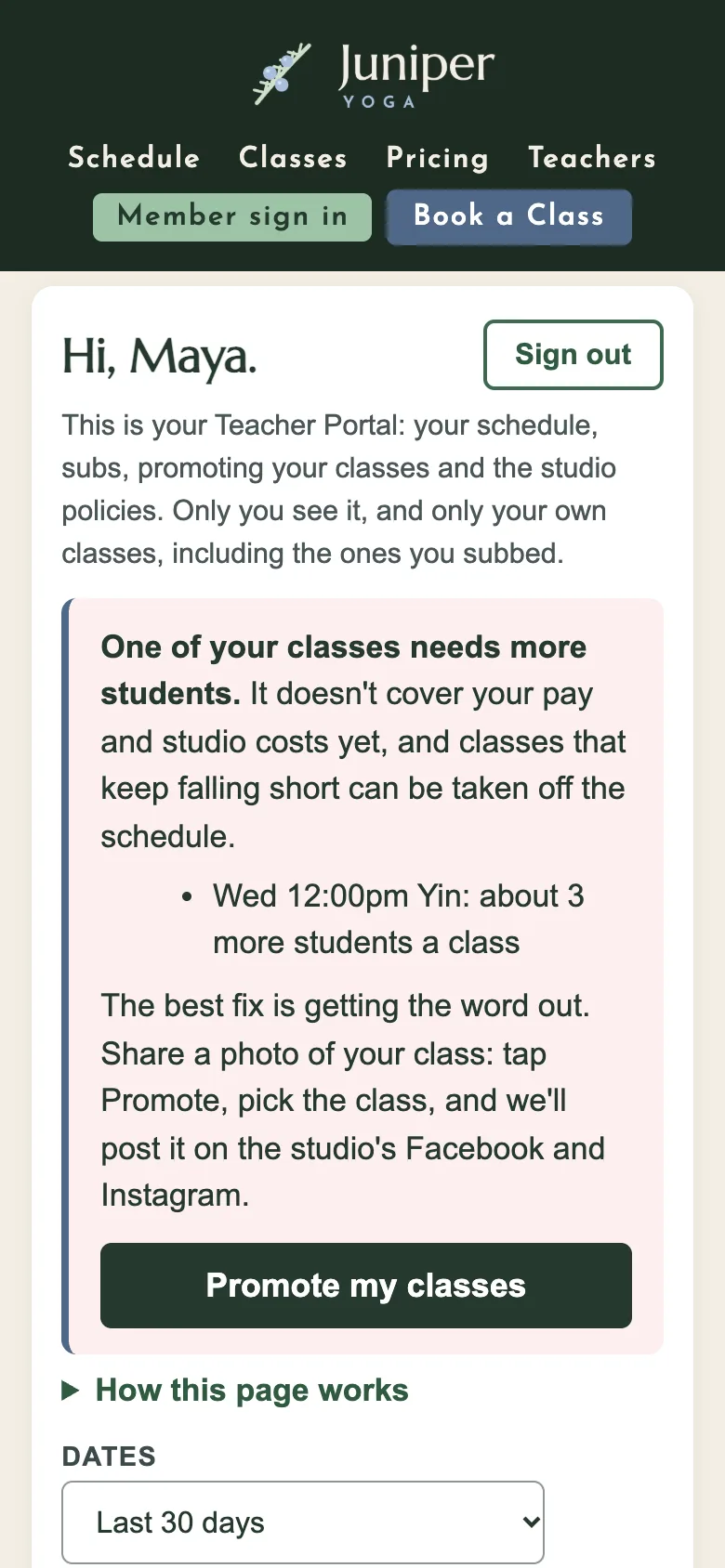
Teacher Portal home on a phone: classes taught, students per class and pay
Teacher PortalSubs, class lists, pay and policies on each teacher's phone.
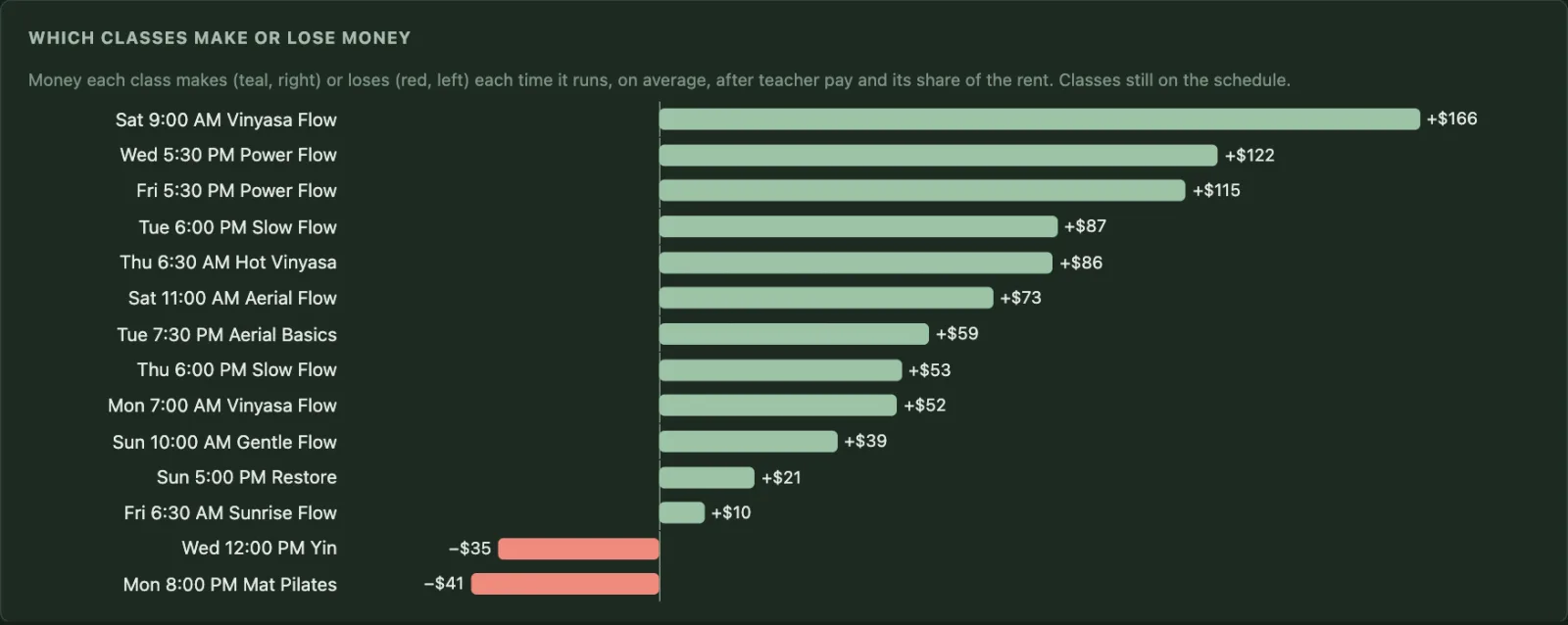
Chart of what each class has left after teacher pay and rent
Class profitWhat every class has left after teacher pay and rent.
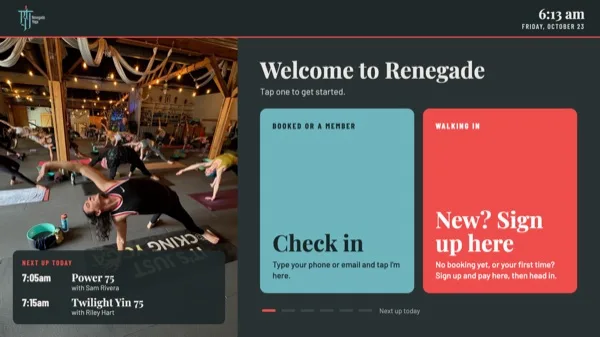
The lobby kiosk welcome screen with Check in and New? Sign up here buttons
Lobby kioskMembers check in. Walk-ins sign up and pay on their phone.
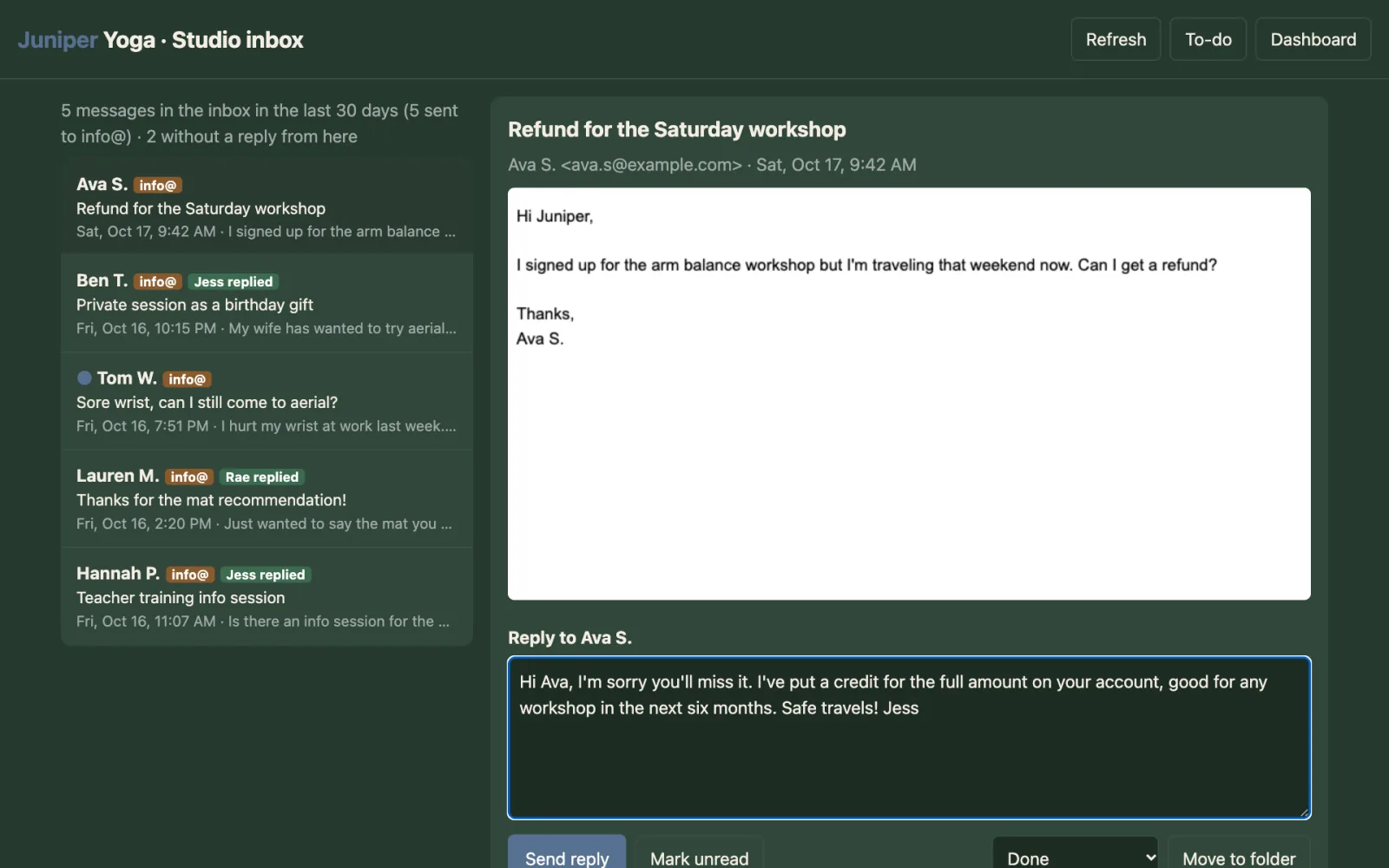
The shared studio inbox with replies tagged by who wrote them
Studio inboxOne inbox, the common questions already answered.
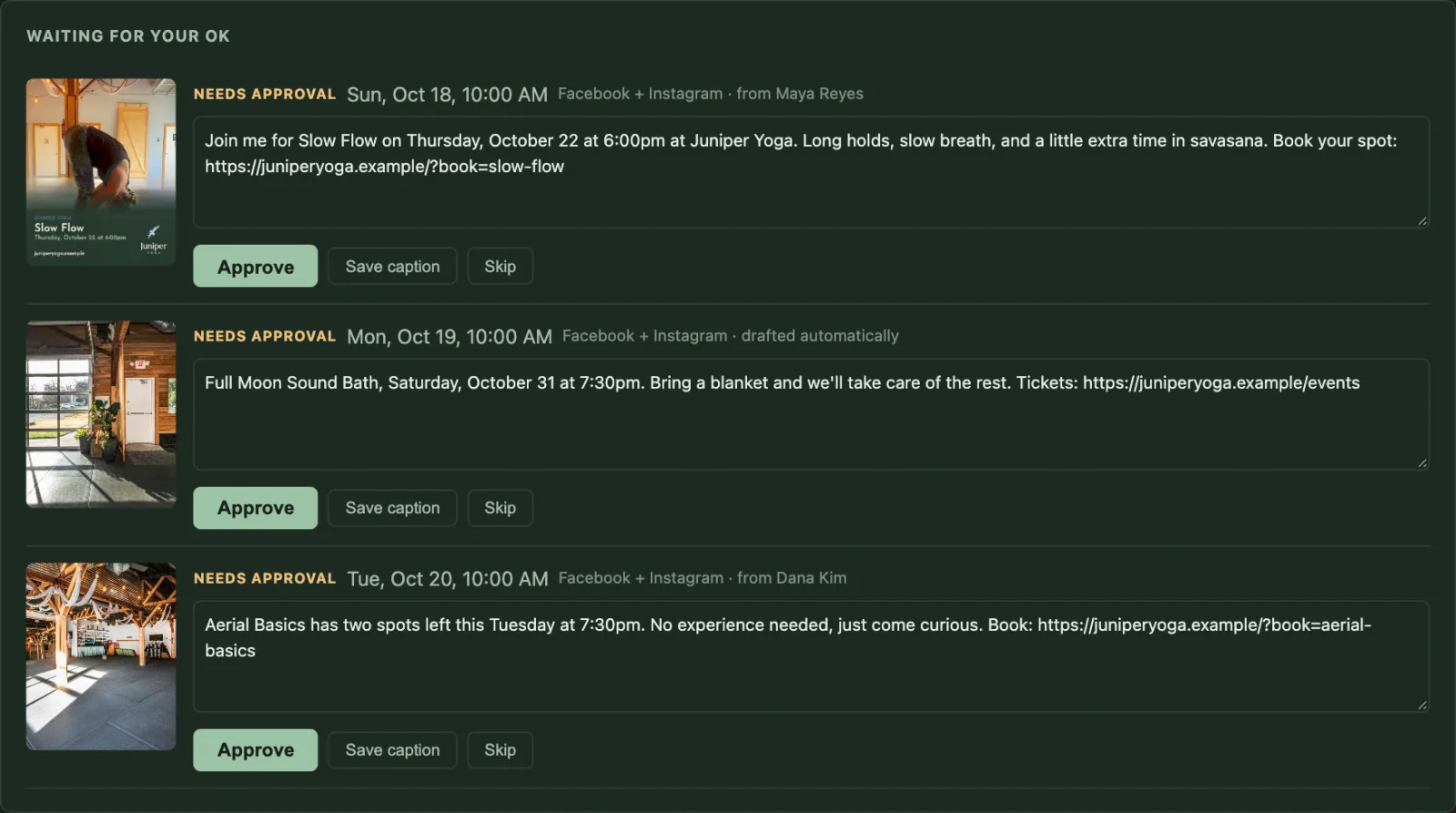
Marketing page with teacher posts waiting for the owner's OK
MarketingTeacher posts and flyers, on your brand, after your OK.

What it fixes

Three jobs that eat your week

Subs without the group text

Right now

A teacher posts in the group chat. Half the teachers have it muted. You end up texting people one by one.

With Studio Bolster

The teacher taps Need a sub. Everyone who can teach that class gets an email, and the first to tap I'll take it gets it.

Teacher Portal

Know which classes make money

Right now

You know which classes feel full. You don't know which ones pay for the teacher and the rent.

With Studio Bolster

Every class shows what it has left after teacher pay and its share of rent, and how many more students a short class needs.

Class profit

A front desk that answers at 11pm

Right now

"Do I need a mat?" "Can I freeze my membership?" The questions come in after you've gone to bed.

With Studio Bolster

Email, texts, calls and website chat get answered from your own policies. Refunds, complaints and injuries go to a person.

Front desk

One minute, no sound needed

A sub, found from a phone

Maya can't teach Thursday's Slow Flow. She opens her Teacher Portal and taps Need a sub. Every other teacher gets an email. Dana opens hers, taps I'll take it, and the class is hers. Maya hears back right away.

No group text. No owner in the middle at 10pm.

Shown with Juniper Yoga, our made-up demo studio. The teachers, classes and numbers are invented.

More about the Teacher Portal

Only here

Things WellnessLiving doesn't do, and most other software doesn't either

We checked nine studio systems in October 2026. These five were missing from WellnessLiving, and most were missing everywhere.

  • Teachers post their own subsWellnessLiving only lets staff assign a sub. Here the teacher asks and the first yes gets the class.
  • Class profit after rentA few systems subtract teacher pay. None we found also count the room.
  • Certifications that remind youCPR and Yoga Alliance on file, with a to-do before anything runs out.
  • Hours ready for GustoTeacher hours and sub classes in a file for Gusto's payroll import.
  • A lobby screen that takes walk-insNew people sign up, sign the waiver and pay on their own phone, and land on the teacher's list.

See the full comparison

Everything in it

What Studio Bolster does

Four parts. Take the ones you need.

Teachers

  • Sub requestsAsk, take, done. Only teachers approved for that class are asked.
  • Class lists and check-inToday's students on the teacher's phone.
  • Pay and class numbersEach teacher sees their own, nobody else's.
  • Class profitAfter teacher pay, payroll tax and rent.
  • CertificationsExpiry dates and reminders.
  • Hours for GustoA file ready for Gusto's import.
  • Policies and agreementsSigned on the phone, with a record.
Teacher Portal

Front desk

  • Email, text and chat answersFrom the policies you approve.
  • Phone calls answeredToday's schedule, prices, what to bring.
  • Account checksWhy a pass didn't apply, before you call back.
  • Lobby kioskCheck-in, walk-ins, the week on screen.
  • One shared inboxSensitive messages go to a person.
Front desk

Marketing

  • Flyers in three tapsAlways on your colors and fonts.
  • Teacher postsThey share, you approve.
  • Facebook and InstagramScheduled from one page.
  • Emails for WellnessLivingBuilt here, sent from your account.
  • Photo and video libraryEverything tagged by class.
Marketing

Website

  • Live scheduleStraight from WellnessLiving.
  • Booking on your own siteMembers book without leaving it.
  • Studio StyleLogo set, colors and fonts every tool uses.
  • Event pages and chatBuilt and kept up for you.
Websites

Built in a real studio

It runs Renegade Yoga in Knoxville

Studio Bolster started as the tools Renegade's owner built for her own studio, after the sub chat and the after-hours inbox got to be too much. WellnessLiving still runs the booking and billing. Everything else on this page runs there every day.

The teachersfind subs, check students in and see their pay in the Teacher Portal
Every callto the studio number is answered, day or night
The lobby screenchecks members in and signs up walk-ins
Every classshows what it has left after pay and rent

We're collecting Renegade's before-and-after numbers now and will post them once they're checked.

Read the story

Renegade Yoga's studio room with wood beams and morning light

What you get

Set up for you, not handed a login

Setup on a call

We load your teachers, pay rates, rent and policies with you, using your real schedule.

Your Studio Style

Your logo set, colors and fonts, made once and used by every flyer, email and screen.

Teachers in, week one

They sign in with an emailed code. No password, no app to download.

A direct line

You talk to the person who built it, not a ticket queue.

How it starts

  1. Turn on the API add-onWellnessLiving charges $19 a month for it. We help you ask for access; it's one email from you.
  2. Set it up togetherOn a call we load your teachers, pay rates, rent, policies and logo.
  3. Invite your teachersThey get a sign-in code by email and are in within a minute.

Questions

What owners ask first

Do I have to leave WellnessLiving?

No. Your members, memberships, card details, waivers and booking stay in WellnessLiving. Studio Bolster reads your schedule and attendance and adds what WellnessLiving doesn't do.

What does it cost?

$68 a month per location for each part, or $188 for Teachers, Front desk and Marketing together. Founding studios pay half for the first year. See pricing.

Do my teachers need an app?

No. The Teacher Portal is a web page. They sign in with a 6-digit code we email them.

Does anything post or send without me?

No. Teacher posts and drafted emails wait for your OK. The front desk only answers from policies you approved, and hands anything about money, injuries or complaints to a person.

I'm on Mindbody. Can I use it?

Not yet. It's built for WellnessLiving today. Sign up anyway: it tells us where to go next.

All questions

Founding studios

Half price for the first year

We're taking a small group of WellnessLiving studios first. You get Studio Bolster at half price for twelve months. In return you tell us what works and what doesn't, and give us a quote we can use once you're happy.

  • Setup done with you, on a call, using your real schedule
  • Your teachers signed in within the first week
  • A direct line to the person who built it

On Mindbody or something else? Sign up anyway. It tells us where to go next.

Which booking software do you use?

Amber reads every one of these herself. We never share your details.